
Building pages without a Content Management System and being in charge of every trivial detail as fixing a typo on a blog, can end up burning development time and slowing content delivery.
This isn’t scalable. It’s clunky. And for content teams? It’s frustrating.
But what if it didn’t have to be that way?
What if your developers can focus on writing the UI component and your content authors on writing the content? All independently and with the proper tools to go to market fast. What if turning a static page into a visually editable experience only took a few lines of code?
And what if you could do all of that with the stack you already know, whether that’s Next.js, React, Angular, or others?
Meet the Universal Visual Editor (UVE)
dotCMS gives you the best of both worlds: the power of a headless CMS that accelerates your development team, and the flexibility of visual, in context editing for your content team. With the Universal Visual Editor, editors can create, update, and publish content to any channel without needing a developer for every change.
Meanwhile, developers stay in control of the codebase and integrations, and aren’t forced into a rigid hybrid model. You get full flexibility, and your editors get true autonomy.
Simple Integration with Our SDKs
We provide SDKs for UVE that eliminate glue code. Whether using Next.js, Angular, or another framework, our SDKs equip your developers to focus on their components, design, and branding.
Let’s walk through a real example using the dotCMS + Next.js starter.
Environment Setup
First set up your environmental variables to connect the frontend with your dotCMS instance::
DOTCMS_HOST
The URL of your dotCMS backend (e.g. https://demo.dotcms.com).DOTCMS_AUTH_TOKEN
A valid authorization token. You can generate this from your dotCMS instance or request one from your system administrator.DOTCMS_SITE_ID (optional)
Since dotCMS supports multi-site management within the same instance, you’ll need the identifier of the specific site you’re working on.
How does this look on our NextJS starter?
Look at .env.local.example
NEXT_PUBLIC_DOTCMS_AUTH_TOKEN=YOUR_API_TOKEN
NEXT_PUBLIC_DOTCMS_HOST=http://localhost:8080/
NEXT_PUBLIC_DOTCMS_SITE_ID=59bb8831-6706-4589-9ca0-ff74016e02b2
But this is an example file, you’ll have to create a valid .env.local using the actual values you need.
You can do it by running this on your terminal:
cp .env.local.example .env.localThat will create a new file with the correct variables for you to set.
Installing the libraries
Remember to run an npm install apart from NextJS and React related libraries, it will install the key libraries to make the magic happen:
Connect to the dotCMS API
Render dynamic content
Enable visual editing with UVE
Get full type safety during development
These packages give you everything you need to:
Curious about what each package does? Feel free to explore them before moving on. 💡
Once that’s done, you're ready to wire everything up and make your content editable.
Initializing the client
Now with this value set, we can start by initializing our fetch client. It looks something like this:
utils/dotCMSClient.js
import { createDotCMSClient } from "@dotcms/client/next";

export const dotCMSClient = createDotCMSClient({
    dotcmsUrl: process.env.NEXT_PUBLIC_DOTCMS_HOST,
    authToken: process.env.NEXT_PUBLIC_DOTCMS_AUTH_TOKEN,
    siteId: process.env.NEXT_PUBLIC_DOTCMS_SITE_ID,
    requestOptions: {
        cache: "no-cache",
    },
});
And you can find it exactly here on our starter.
Now with our client initialized, we can fetch for pages as simple as doing the following:
utils/getDotCMSPage.js
export const getDotCMSPage = async (path, searchParams = {}) => {
    try {
        const pageData = await dotCMSClient.page.get(path, {
            ...searchParams
        });
        return pageData;
    } catch (e) {
        console.error('ERROR FETCHING PAGE: ', e.message);

        return null;
    }
};
Use client.get.page to fetch pages from DotCMS. You can find more information on how it works here.
You’ll find a slightly more advanced version of this function in our starter, where we enrich the response using GraphQL Queries to fetch additional data alongside the page.
Bringing in Next.js Dynamic Routes
Now that everything is wired up, it's time to integrate it into your app using NextJS Dynamic Routes.
Next.js makes it easy to serve different pages based on the URL path, perfect for loading DotCMS-managed pages dynamically.
app/[[...slug]]/page.js
import NotFound from "@/app/not-found";
import { Page } from "@/views/Page";
import { getDotCMSPage } from "@/utils/getDotCMSPage";

export default async function Home(props) {
    const searchParams = props.searchParams;
    const params = props.params;
    const path = params?.slug?.join('/') || '/';

    // Here we get our page content
    const pageContent = await getDotCMSPage(path, searchParams);

    if (!pageContent) {
        return <NotFound />;
    }

    return <Page pageContent={pageContent} />;
}
In the starter, you’ll find a slightly different code that handles VanityURLs, but this code should be sufficient for you to work on.
But hey, what is that Page component?
In that component is where the magic happens. ✨
Rendering the page
Now we have enough data to plug in our DotCMS response to React Components and, at the same time, make it editable on the UVE.
views/Page.js
'use client';

import { DotCMSLayoutBody, useEditableDotCMSPage } from '@dotcms/react/next';

import { pageComponents } from '@/components/content-types';

export function Page({ pageContent }) {
    const { pageAsset } = useEditableDotCMSPage(pageContent);

    return (
        <DotCMSLayoutBody
            page={pageAsset}
            components={pageComponents}
        />
    );
}
Yes, as easy as that, you just need to use the useEditableDotCMSPage hook that connects to the UVE to take the pageAsset and pass it to the DotCMSLayoutBody component.
Those two pieces are the ones that make your page editable on the UVE, it feels like magic!
Now we just need to run the project
npm run devAnd If you want to go and run the page on the UVE. Don’t forget to configure it on your DotCMS instance, it’s really simple, here is a guide to set it up.
But what is that pageComponents object?
We use a map to populate your DotCMS Content Types as Components, that object can be found here and it looks like this:
components/content-types/index.js
import { CustomNoComponent } from "./Empty";
import Activity from "./Activity";
import Banner from "./Banner";
import BannerCarousel from "./BannerCarousel";
import CalendarEvent from "./CalendarEvent";
import CallToAction from "./CallToAction";
import CategoryFilter from "./CategoryFilter";
import SimpleWidget from "./SimpleWidget";
import ImageComponent from "./Image";
import PageForm from "./PageForm";
import Product from "./Product";
import StoreProductList from "./StoreProductList";
import VtlInclude from "./VtlInclude";
import WebPageContent from "./WebPageContent";

export const pageComponents = {
    Activity: Activity,
    Banner: Banner,
    BannerCarousel: BannerCarousel,
    calendarEvent: CalendarEvent,
    CallToAction: CallToAction,
    CategoryFilter: CategoryFilter,
    CustomNoComponent: CustomNoComponent,
    Image: ImageComponent,
    PageForm: PageForm,
    Product: Product,
    SimpleWidget: SimpleWidget,
    StoreProductList: StoreProductList,
    VtlInclude: VtlInclude,
    webPageContent: WebPageContent,
};
And inside the component you will receive the props matching the Content Type model, you can learn more about our Pages Architecture right here.
This is awesome for you as a developer right? 10 minutes at most and you have it plugged into the UVE.
But how does this help your Content Authors?
Making Your Content Team Happier
So what can editors actually do with the Universal Visual Editor? A lot.
Need to add new content?
No problem, they can just drag and drop it.
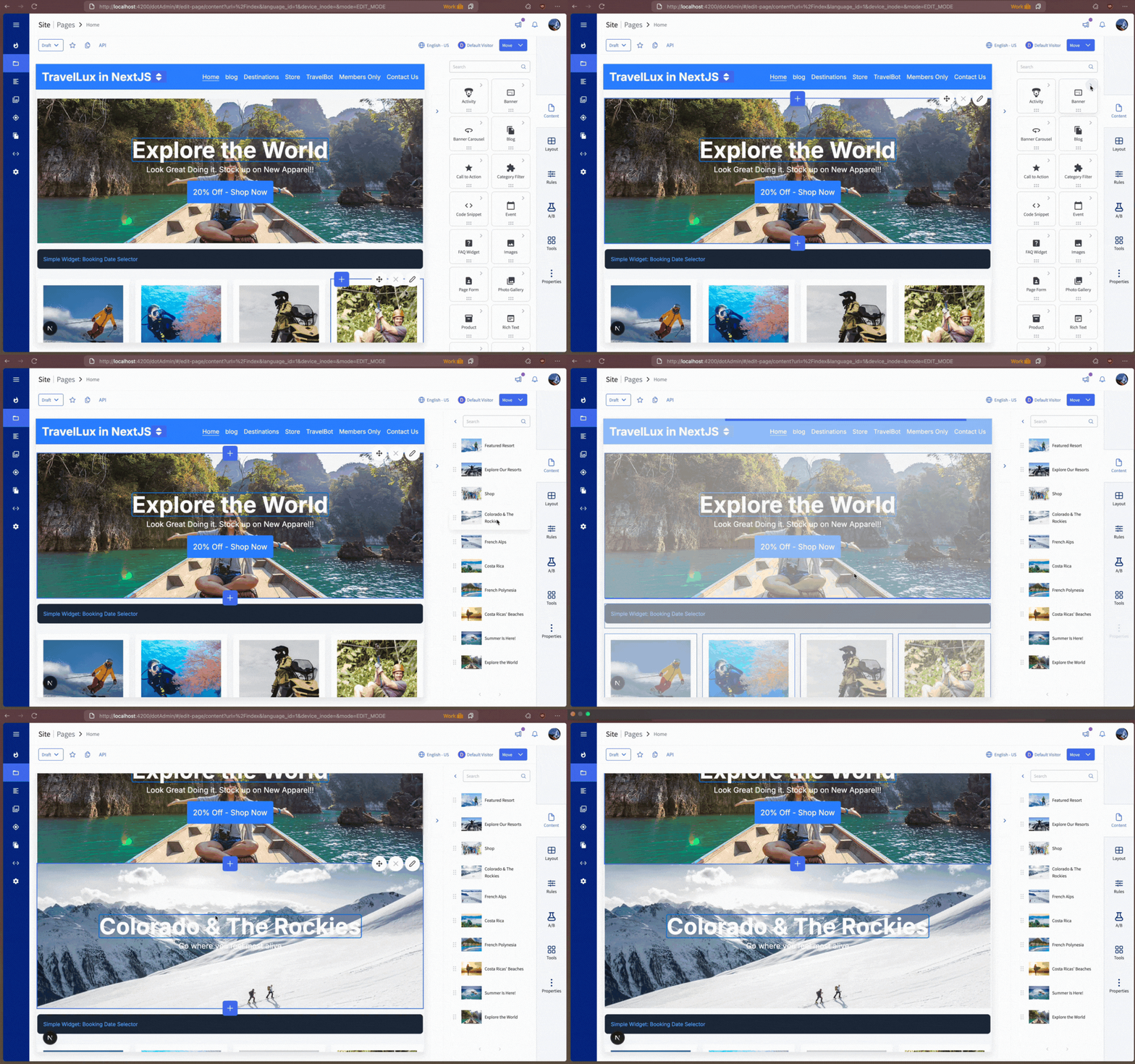
Want to create something from scratch?
They’ve got the tools. No dev tickets needed

Need to edit something?
Easy. Just click and update.

Dropped something in the wrong spot?
No stress, just drag it where it belongs.

Want to preview content on mobile?
There’s a built-in preview mode for that.

Need to rearrange full layouts?
Rows, columns, they can move it all.

All of this, without calling a developer. You stay focused on building new components, while your content team takes full ownership of the site experience.
Happier editors. Less dev friction. Everyone wins! 🚀